
How to Build a Personal Study Dashboard Using Notion or Trello

Crafting a personal study dashboard using Notion or Trello transforms chaotic study routines into streamlined systems, boosting productivity and focus.
Anúncios
In 2025, with digital tools evolving rapidly, students and lifelong learners need tailored solutions to manage coursework, track progress, and stay motivated.
Notion’s all-in-one workspace and Trello’s Kanban-style boards offer distinct yet complementary approaches to organizing academic life.
This guide dives into creating a customized dashboard, blending creativity, strategy, and cutting-edge features to elevate your study game.
Why settle for scattered notes when you can build a hub that sparks clarity and drive?
Anúncios
Why a Study Dashboard Matters in 2025
Imagine your study routine as a bustling city: without a map, you’re lost in traffic.
A personal study dashboard acts as that map, centralizing resources, deadlines, and goals.
According to a 2023 study by the National Center for Education Statistics, 62% of students reported feeling overwhelmed by disorganized study materials.
A dashboard counters this chaos, offering a single source of truth.
Whether you’re juggling college assignments, professional certifications, or self-paced learning, a well-designed system saves time and mental energy.
In addition, the rise of online learning platforms emphasizes the need for organized study spaces.
Students are now more likely to engage with multiple sources of information, making a centralized dashboard essential for effective learning.
Notion and Trello stand out for their flexibility.
Notion’s databases and rich media support suit those who crave depth, while Trello’s visual boards appeal to fans of simplicity.
Both integrate with tools like Google Calendar and Zapier, ensuring your dashboard syncs with your digital ecosystem.
Let’s explore how to build one, step by step, with each tool.
Step 1: Define Your Study Goals and Structure
Before diving into templates or widgets, clarify your objectives.
Are you prepping for exams, mastering a new skill, or tracking long-term projects?
Specific goals shape your dashboard’s layout.
For example, a medical student might prioritize flashcards and lecture notes, while a coding bootcamp participant needs task trackers and resource links.
Actionable Tips:
- List Priorities: Write down 3–5 core study areas (e.g., readings, assignments, practice tests).
- Set Timeframes: Assign deadlines or milestones to keep momentum.
- Choose a Framework: Decide between a weekly overview, subject-based split, or project-driven structure.
Table 1: Goal-Setting Framework for Your Dashboard
| Focus Area | Example Goal | Dashboard Component |
|---|---|---|
| Coursework | Complete 2 chapters weekly | Task list with due dates |
| Skill Development | Build 1 coding project monthly | Progress tracker |
| Exam Prep | Review 50 flashcards daily | Embedded quiz or habit tracker |
This clarity ensures your personal study dashboard using Notion or Trello aligns with your unique needs, avoiding generic setups that fizzle out.
Additionally, regularly revisiting your goals can help you adapt your dashboard as your study needs evolve.
This adaptability is vital in an ever-changing educational landscape, where new subjects and skills may emerge unexpectedly.
+ How to Deal with the Guilt of Procrastination in Academic Life
Step 2: Building Your Dashboard in Notion
Notion’s strength lies in its modular design, letting you combine text, tables, calendars, and embeds in one workspace.
Think of it as a digital Lego set—build what fits your brain.
How to Set It Up:
- Create a New Page: Name it “Study Hub” or something inspiring.
- Add Sections: Use dividers for subjects, projects, or weeks.
- Use Databases: Create a table for tasks with columns for status, priority, and due date. Add a calendar view for deadlines.
- Embed Resources: Link lecture videos, PDFs, or Google Docs directly.
- Add Widgets: Use third-party tools like Indify to embed timers or motivational quotes.
Example: Sarah’s Notion Dashboard
Sarah, a psychology major, built a personal study dashboard using Notion or Trello (in this case, Notion) to manage her thesis and coursework.
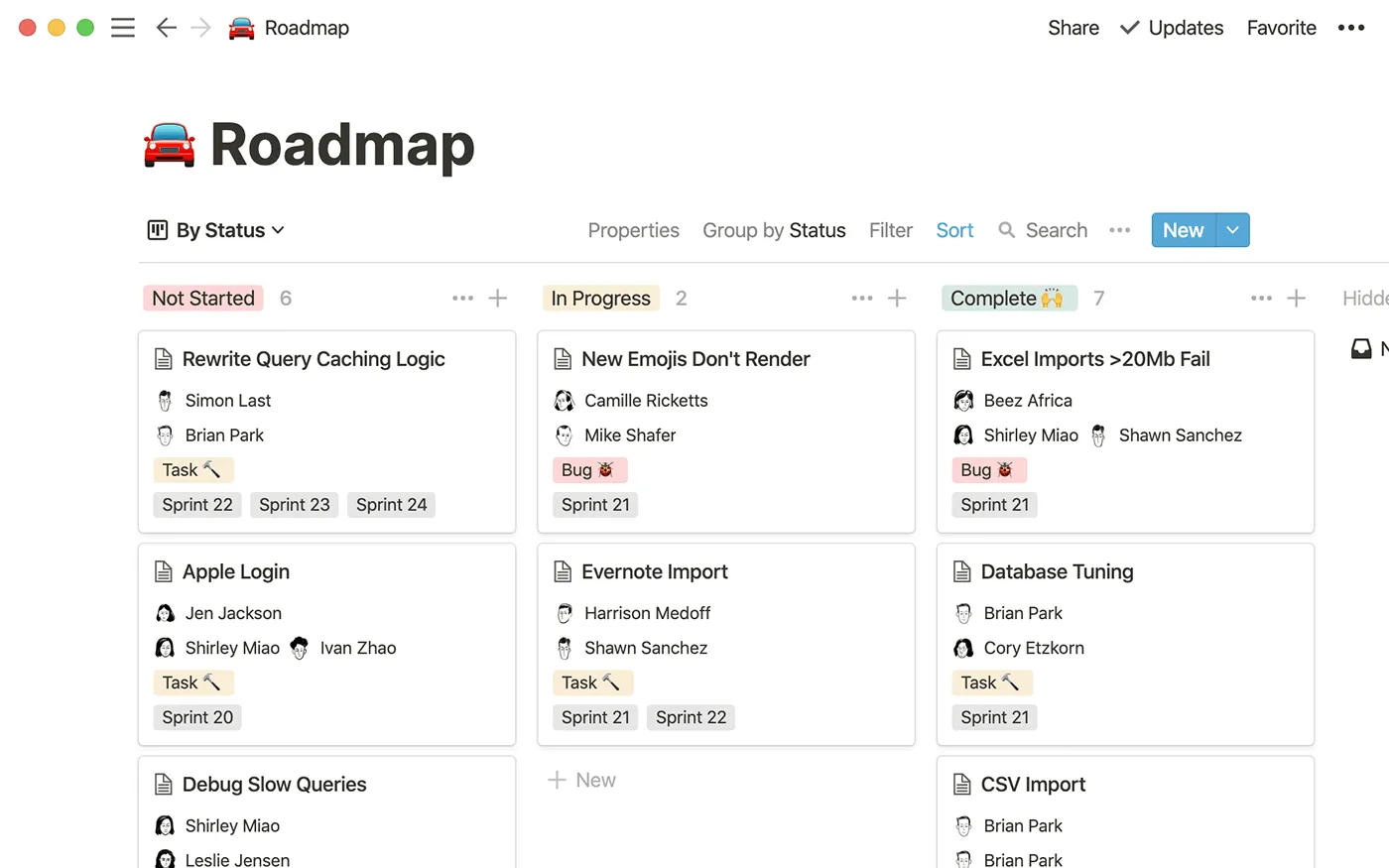
Her homepage features a table of active courses, each linking to sub-pages with lecture notes and reading lists.
A Kanban board tracks her thesis progress, with cards for “Research,” “Drafting,” and “Editing.”
She embedded a Pomodoro timer widget to stay focused during study sessions.
This setup cut her planning time by 30%, letting her focus on deep work.
Pro Tip:
Toggle between views (list, board, calendar) to spot bottlenecks.
Notion’s AI assistant, updated in 2025, can now suggest task prioritizations based on deadlines, adding a smart layer to your workflow.
For more tips on maximizing Notion for study purposes, check out the Notion Blog.
Step 3: Crafting a Trello Study Board
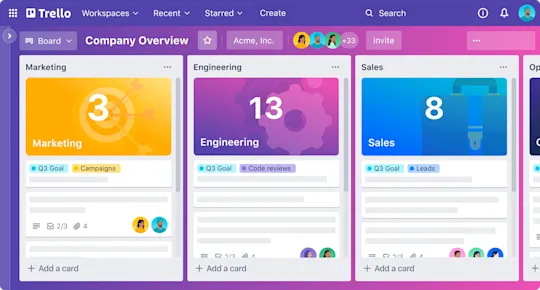
Trello’s Kanban boards shine for visual learners who thrive on drag-and-drop simplicity.
Each board is a canvas where tasks flow from “To Do” to “Done,” offering instant gratification.
Setup Guide:
- Create a Board: Name it “Study Central.”
- Add Lists: Start with “Backlog,” “In Progress,” “Review,” and “Completed.”
- Use Cards: Each card represents a task (e.g., “Read Chapter 5”). Add checklists, due dates, and attachments.
- Label Tasks: Color-code by subject or urgency (e.g., red for high-priority).
- Integrate Power-Ups: Connect Google Drive for files or Calendar for deadlines.
Example: Malik’s Trello Board
Malik, a data science bootcamp student, uses a personal study dashboard using Notion or Trello (here, Trello) to track his projects.
His board has lists for “Concepts to Learn,” “Coding Exercises,” and “Portfolio Projects.”
Each card includes links to tutorials and checklists for subtasks.
He uses Trello’s Butler automation to move completed tasks to a “Wins” list, boosting motivation.
This visual flow helped him complete his first machine learning project two weeks early.
Why Trello Works:
Its simplicity reduces setup time, ideal for those who want a plug-and-play solution.
Trello’s 2025 updates include AI-driven card suggestions, making it easier to break down complex tasks.
Table 2: Notion vs. Trello for Study Dashboards
| Feature | Notion | Trello |
|---|---|---|
| Best For | Detailed, nested organization | Visual, task-driven workflows |
| Learning Curve | Moderate (rich features) | Low (intuitive drag-and-drop) |
| Customization | High (databases, embeds) | Moderate (labels, power-ups) |
| Mobile Experience | Robust (full editing) | Streamlined (task-focused) |
Step 4: Supercharge Your Dashboard with Integrations
Both tools integrate with apps to amplify functionality.
Zapier can automate task creation from emails, while Google Calendar syncs deadlines.
Notion’s API, enhanced in 2025, allows custom scripts for power users, like auto-generating study schedules.
Trello’s Power-Ups, such as Miro for mind maps, add creative flair.
Integration Ideas:
- Pomodoro Apps: Sync with Focus@Will for timed study sessions.
- Note-Taking: Link Obsidian or Evernote for seamless research.
- Analytics: Use Notion’s database filters or Trello’s Dashcards to track study hours.
Integrating these tools can significantly enhance your productivity by automating repetitive tasks and centralizing information.
As technology advances, staying updated with new integrations will keep your dashboard relevant and effective.
Step 5: Maintain and Evolve Your Dashboard
A dashboard isn’t a one-and-done project—it’s a living system.
Review it weekly to prune outdated tasks and add new goals.
Experiment with layouts to keep it fresh.
Notion users can try gallery views for visual inspiration, while Trello fans can test new list structures.
Maintenance Checklist:
- Archive Old Tasks: Clear completed items to reduce clutter.
- Update Priorities: Reassess weekly based on deadlines.
- Seek Feedback: Share your setup with peers for new ideas.
Regular maintenance not only keeps your dashboard functional but also encourages ongoing engagement with your study materials.
This proactive approach fosters a habit of continuous improvement in your study practices.
Overcoming Common Pitfalls
Building a personal study dashboard using Notion or Trello can falter without strategy.
Avoid these traps:
- Overcomplicating: Start simple, then scale up.
- Neglecting Updates: A stale dashboard loses value.
- Ignoring Aesthetics: A visually appealing setup boosts engagement.
Being aware of these common pitfalls can help you stay focused on creating a dashboard that truly serves your needs.
By prioritizing simplicity and regular updates, you can maintain a productive study environment.
Notion or Trello: Which Should You Choose?
Your choice hinges on your personality and needs.
Notion suits planners who love customization and depth.
Trello fits those who prioritize speed and clarity.
Can’t decide?
Try both for a week—most users settle on one after testing.
A 2024 X poll showed 54% of students preferred Notion for academic dashboards, but Trello led for short-term projects.
Experimenting with both platforms allows you to find the right fit for your study style, ensuring you maximize your productivity.
++ Study Burnout: How to Identify It and Recover Fast
The Bigger Picture: Why Dashboards Drive Success
A personal study dashboard using Notion or Trello isn’t just about organization—it’s about mindset.
By visualizing progress, you build momentum, turning daunting goals into achievable steps.
It’s a psychological edge, like a climber seeing the summit.
In a world of distractions, this focus is your secret weapon.
Rhetorical Engage:
What could you achieve if every study session felt like a well-orchestrated symphony?
Visualizing your goals and progress can significantly enhance your motivation and commitment to your studies.
This sense of accomplishment fuels your desire to learn and grow.
Bonus: Advanced Tips for 2025
- Voice Mode: Use Notion’s voice input (available on iOS/Android) to dictate tasks hands-free.
- AI Enhancements: Trello’s AI can predict task durations, refining your schedule.
- Community Templates: Explore Notion’s template marketplace for pre-built study hubs, saving hours.
These advanced features and resources can take your study dashboard to the next level, making it even more effective for your learning journey.
Conclusion: Build Your Study Command Center
Creating a personal study dashboard using Notion or Trello empowers you to take charge of your academic journey.
Whether you lean into Notion’s versatility or Trello’s clarity, the key is a system that reflects your goals and fuels progress.
Start small, iterate often, and watch your productivity soar.
In 2025, with AI-driven features and seamless integrations, there’s no excuse for study chaos.
Dive in, experiment, and craft a dashboard that makes learning irresistible.